 站長資訊網
站長資訊網如何構建Angular應用程序?下面本篇文章給大家介紹一下使用MemFire Cloud構建Angular應用程序的方法,希望對大家有所幫助!

如何快速入門VUE3.0:進入學習
【相關教程推薦:《angular教程》】
MemFire Cloud是一款提供云數據庫,用戶可以創建云數據庫,并對數據庫進行管理,還可以對數據庫進行備份操作。它還提供后端即服務,用戶可以在1分鐘內新建一個應用,使用自動生成的API和SDK,訪問云數據庫、對象存儲、用戶認證與授權等功能,可專注于編寫前端應用程序代碼,加速WEB或APP應用開發。
學習視頻地址: www.bilibili.com/video/BV1wt…
此示例提供了使用 MemFire Cloud 和 angular構建簡單用戶管理應用程序(從頭開始)的步驟。這包括:
- MemFire Cloud云數據庫:用于存儲用戶數據的 MemFireDB數據庫。
- MemFire Cloud用戶驗證:用戶可以使用魔法鏈接登錄(只需要電子郵件,不需要密碼)。
- MemFire Cloud存儲:用戶可以上傳照片。
- 行級安全策略:數據受到保護,因此個人只能訪問自己的數據。
- 即時API:創建數據庫表時會自動生成 API。
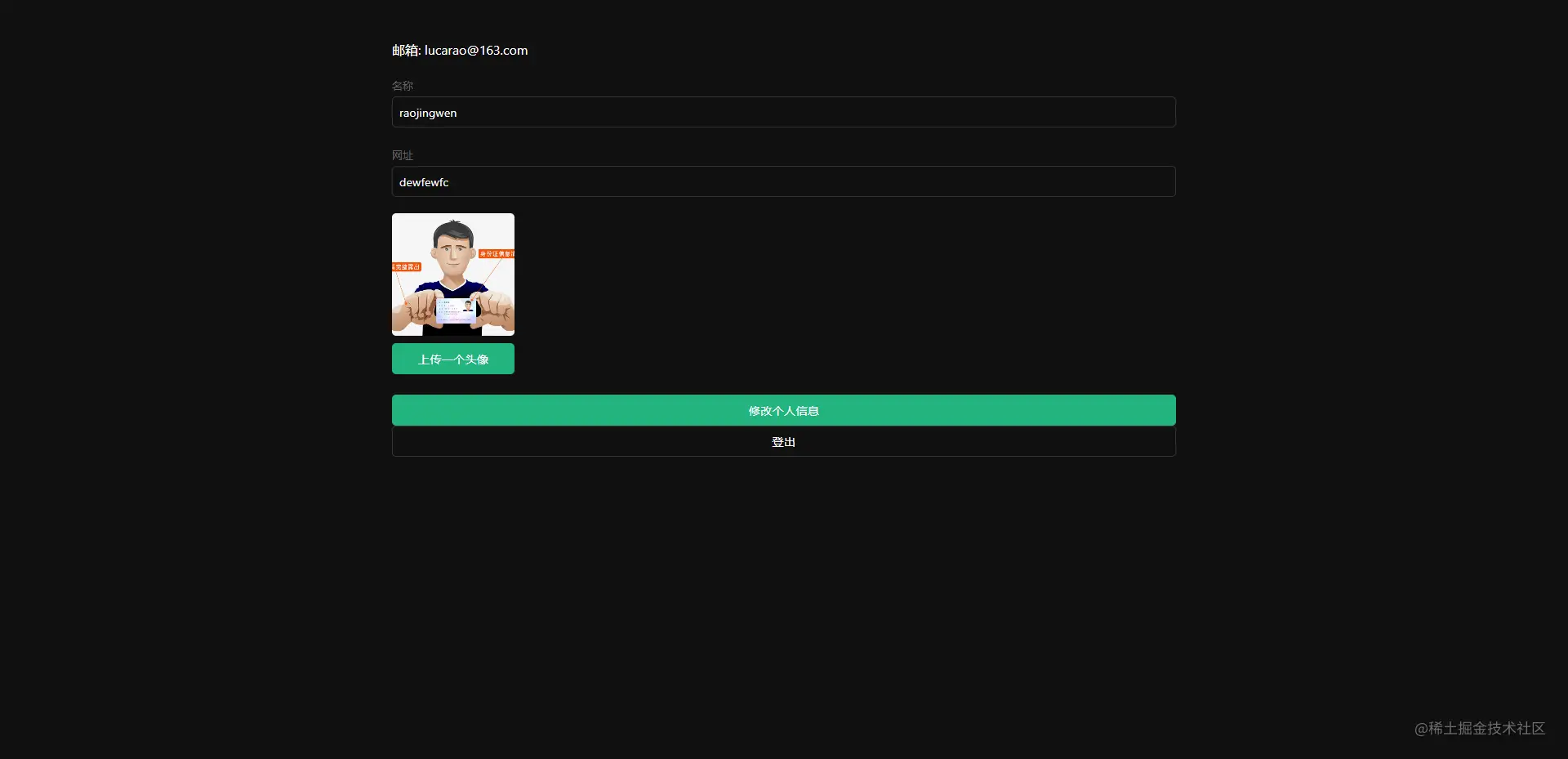
在本指南結束時,您將擁有一個允許用戶登錄和更新一些基本個人資料詳細信息的應用程序:
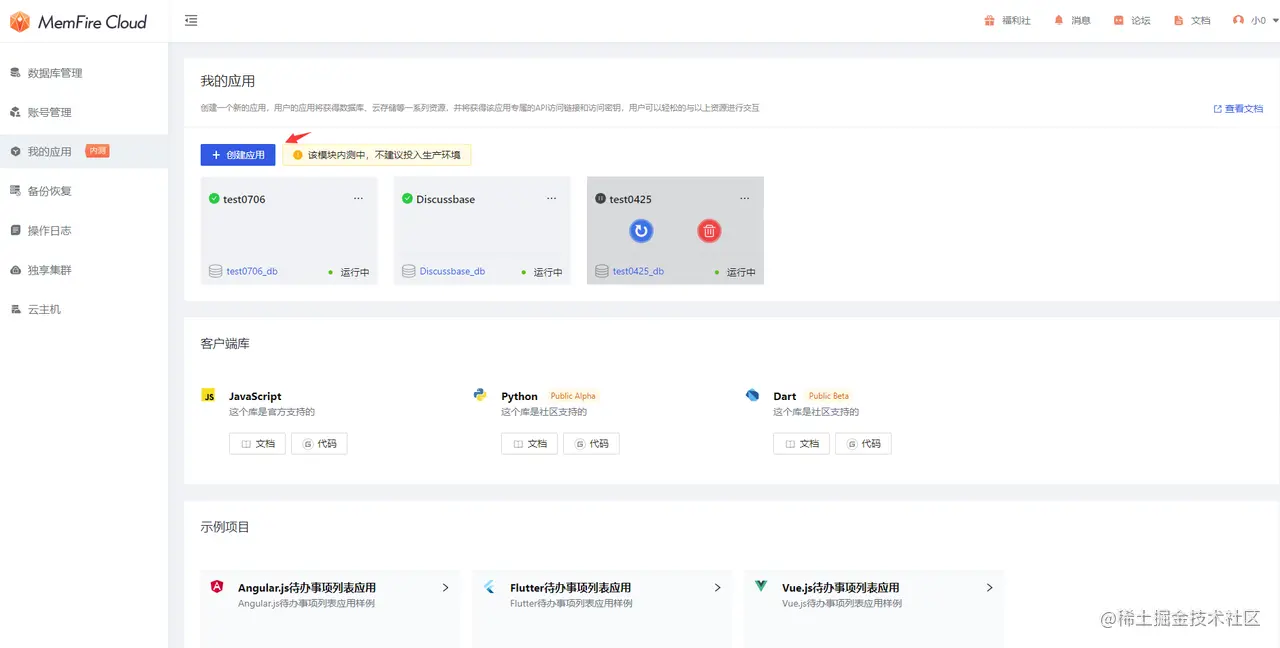
創建應用
目的:我們的應用就是通過在這里創建的應用來獲得數據庫、云存儲等一系列資源,并獲得該應用專屬的API訪問鏈接和訪問密鑰,用戶可以輕松的與以上資源進行交互。
登錄cloud.memfiredb.com/auth/login 創建應用
創建數據表
點擊應用,視圖化創建數據表
1、創建profiles表;
在數據表頁面,點擊“新建數據表”,頁面配置如下:
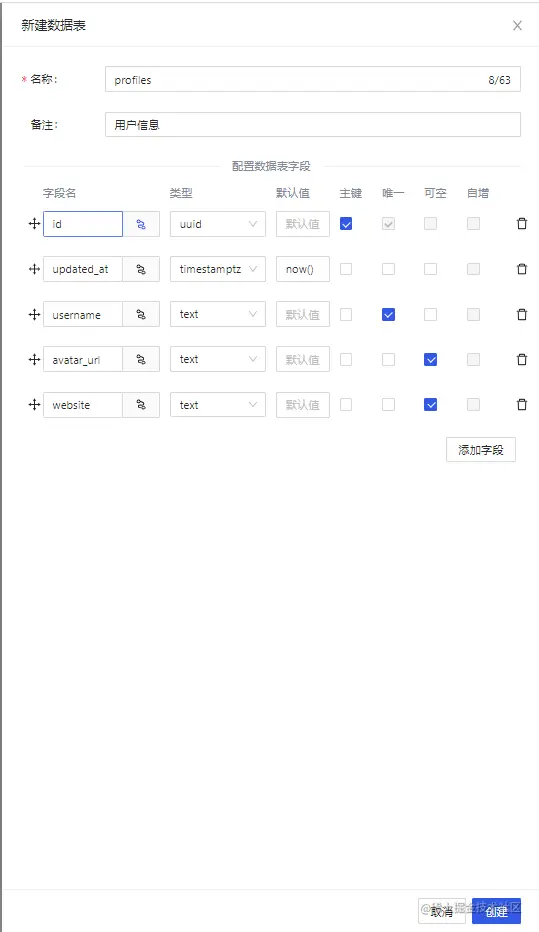
其中profiles表字段id和auth.users表中的id字段(uuid類型)外鍵關聯。
2、開啟Profiles的RLS數據安全訪問規則;
選中創建的Profiles表,點擊表權限欄,如下圖所示,點擊"啟用RLS"按鈕
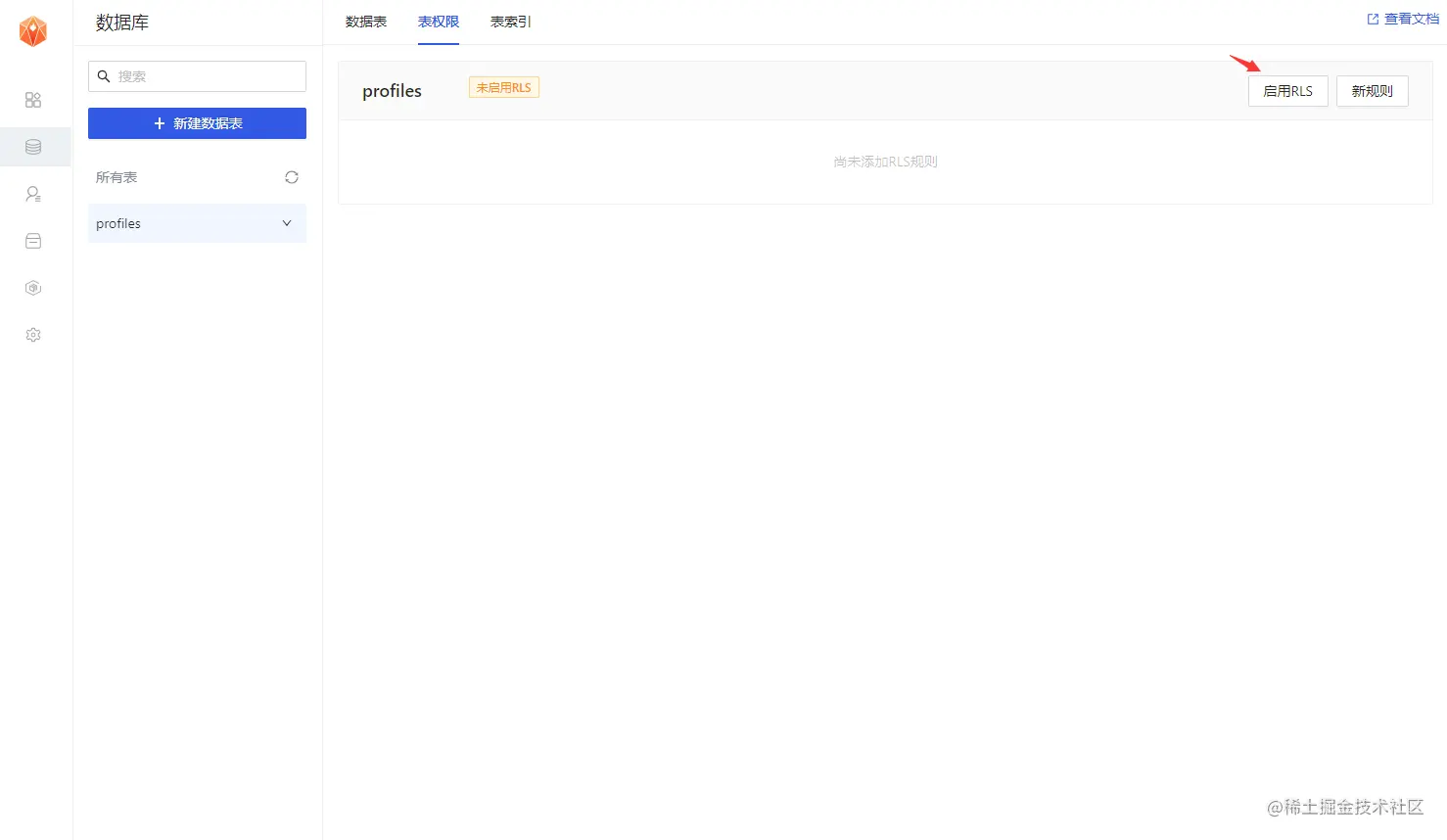
3、允許每個用戶可以查看公共的個人信息資料;
點擊"新規則"按鈕,在彈出彈框中,選擇"為所有用戶啟用訪問權限",輸入策略名稱,選擇"SELECT(查詢)"操作,點擊“創建策略”按鈕,如下圖。
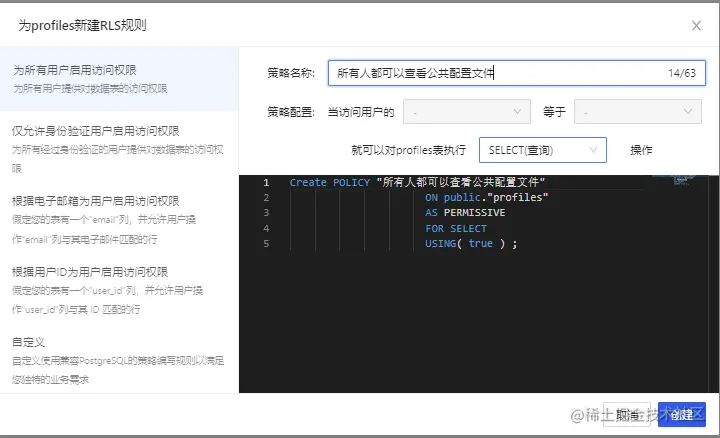
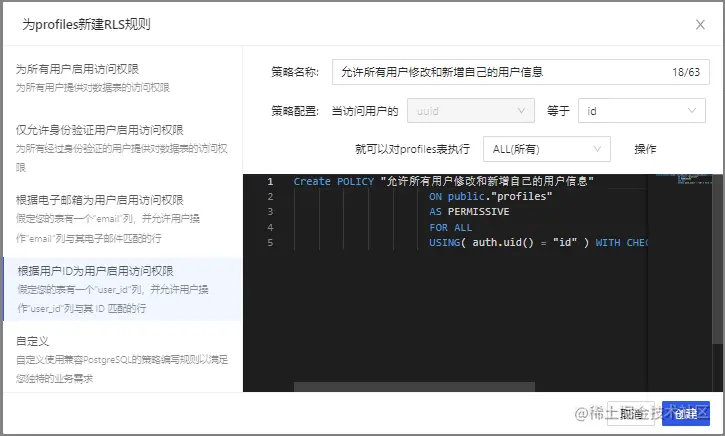
4、僅允許用戶增刪改查本人的個人資料信息;
點擊"新規則"按鈕,在彈出彈框中,選擇"根據用戶ID為用戶啟用訪問權限",輸入策略名稱,選擇"ALL(所有)"操作,點擊“創建策略”按鈕,如下圖。
創建avatars存儲桶
創建云存儲的存儲桶,用來存儲用戶的頭像圖片,涉及操作包括:
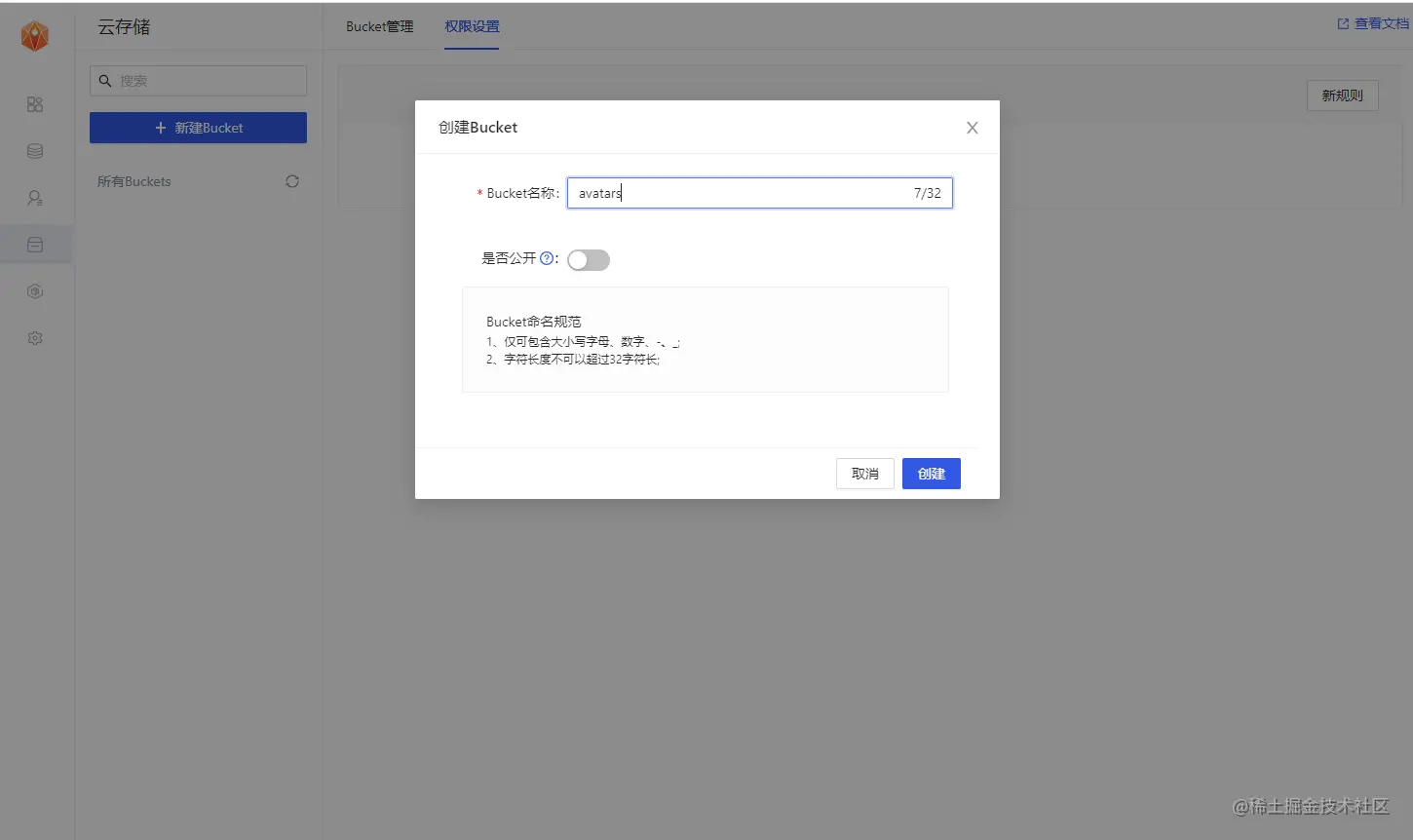
1、創建一個存儲桶avatars
在該應用的云存儲導航欄,點擊“新建Bucket”按鈕,創建存儲桶avatars。
2、允許每個用戶可以查看存儲桶avatars
選中存儲桶avatars,切換到權限設置欄,點擊“新規則”按鈕,彈出策略編輯彈框,選擇“自定義”,如下圖所示:
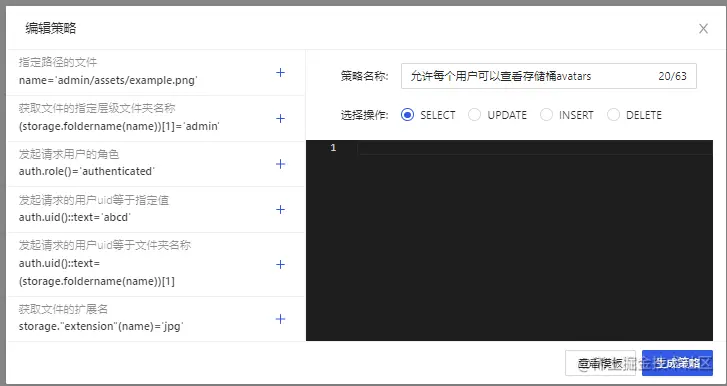
選擇SELECT操作,輸入策略名稱,點擊“生成策略”按鈕,如下圖所示。
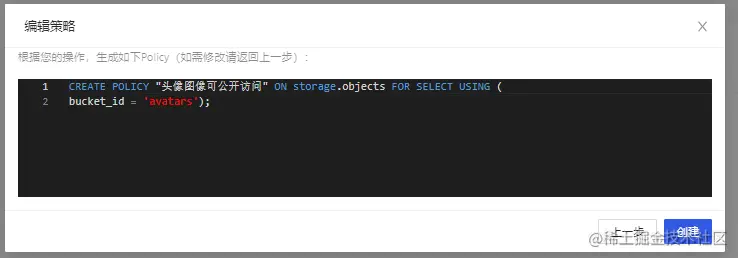
3、允許用戶上傳存儲桶avatars;
選中存儲桶avatars,切換到權限設置欄,點擊“新規則”按鈕,彈出策略編輯彈框,選擇“自定義”,如下圖所示:
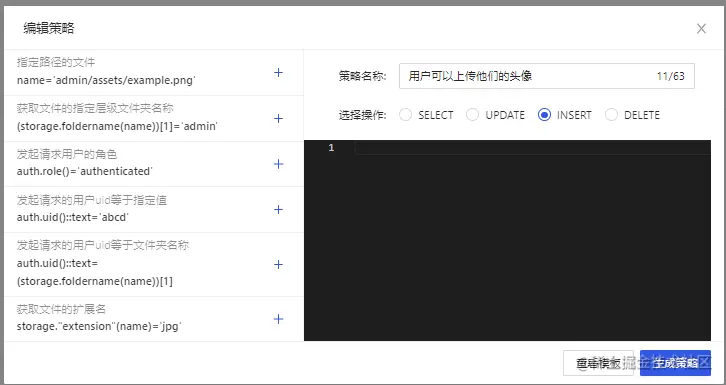
選擇INSERT操作,輸入策略名稱,點擊“生成策略”按鈕,如下圖所示。
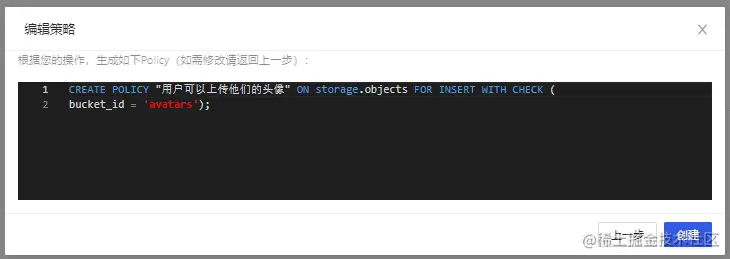
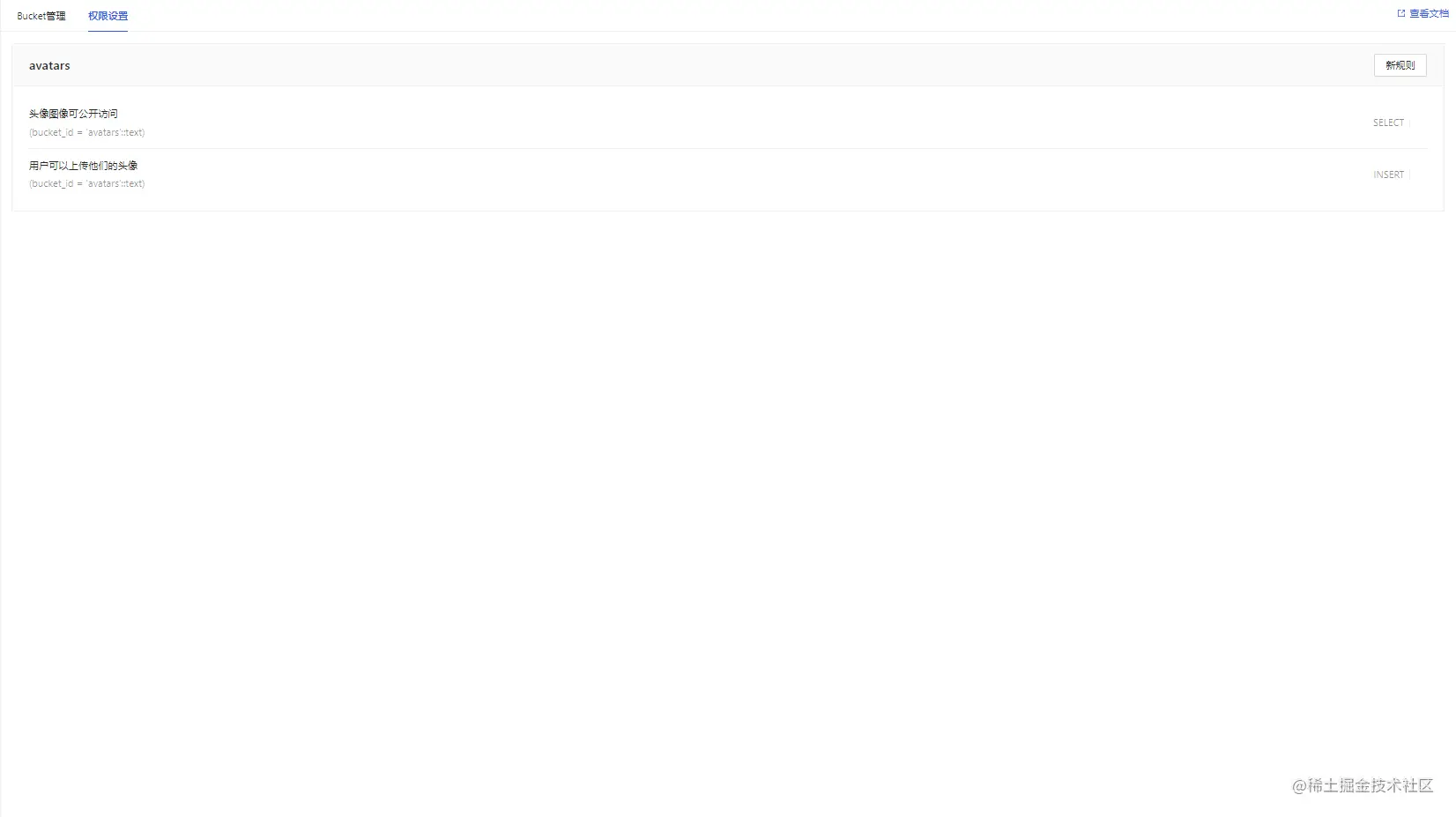
查看結果
所有數據表及RLS的sql(策略名稱用英文代替)
-- Create a table for public "profiles" create table profiles ( id uuid references auth.users not null, updated_at timestamp with time zone, username text unique, avatar_url text, website text, primary key (id), unique(username), ); alter table profiles enable row level security; create policy "Public profiles are viewable by everyone." on profiles for select using ( true ); create policy "Users can insert their own profile." on profiles for insert with check ( auth.uid() = id ); create policy "Users can update own profile." on profiles for update using ( auth.uid() = id ); -- Set up Storage! insert into storage.buckets (id, name) values ('avatars', 'avatars'); create policy "Avatar images are publicly accessible." on storage.objects for select using ( bucket_id = 'avatars' ); create policy "Anyone can upload an avatar." on storage.objects for insert with check ( bucket_id = 'avatars' );
獲取 API秘鑰
現在您已經創建了一些數據庫表,您可以使用自動生成的 API 插入數據。我們只需要從API設置中獲取URL和anon的密鑰。
在應用->概括頁面,獲取服務地址以及token信息。
Anon(公開)密鑰是客戶端API密鑰。它允許“匿名訪問”您的數據庫,直到用戶登錄。登錄后,密鑰將切換到用戶自己的登錄令牌。這將為數據啟用行級安全性。
注意:service_role(秘密)密鑰可以繞過任何安全策略完全訪問您的數據。這個密鑰必須保密,并且要在服務器環境中使用,絕不能在客戶端或瀏覽器上使用。 在后續示例代碼中,需要提供supabaseUrl和supabaseKey。
認證設置
當用戶點擊郵件內魔法鏈接進行登錄時,是需要跳轉到我們應用的登錄界面的。這里需要在認證設置中進行相關URL重定向的配置。
因為我們最終的應用會在本地的4200端口啟動(亦或者其他端口),所以這里我們暫時將url設置為 http://localhost:4200
除此之外,在此界面也可以自定義使用我們自己的smtp服務器。
構建應用程序
讓我們從頭開始構建 Angular應用程序。
初始化項目
我們可以使用Angular CLI來初始化一個名為memfiredb-angular:
Angular 需要 Node.js (>=14.15 <=16.10) 。
npm install -g @angular/cli npx ng new memfiredb-angular --routing false --style css cd memfiredb-angular
然后讓我們安裝唯一的附加依賴項:supabase-js
npm install @supabase/supabase-js
最后,我們要將環境變量保存在environment.ts, 我們需要的是 API URL 和您上面anon復制的密鑰。
src/environments/environment.ts文件
export const environment = { production: false, supabaseUrl: "YOUR_SUPABASE_URL", supabaseKey: "YOUR_SUPABASE_KEY" };
現在我們已經有了 API 憑證,通過ng g s supabase創建一個SupabaseService來初始化 Supabase 客戶端并實現與 Supabase API 通信的函數。
src/app/supabase.service.ts
import { Injectable } from '@angular/core'; import {AuthChangeEvent, createClient, Session, SupabaseClient} from '@supabase/supabase-js'; import {environment} from "../environments/environment"; export interface Profile { username: string; website: string; avatar_url: string; } @Injectable({ providedIn: 'root' }) export class SupabaseService { private supabase: SupabaseClient; constructor() { this.supabase = createClient(environment.supabaseUrl, environment.supabaseKey); } get user() { return this.supabase.auth.user(); } get session() { return this.supabase.auth.session(); } get profile() { return this.supabase .from('profiles') .select(`username, website, avatar_url`) .eq('id', this.user?.id) .single(); } authChanges(callback: (event: AuthChangeEvent, session: Session | null) => void) { return this.supabase.auth.onAuthStateChange(callback); } signIn(email: string) { return this.supabase.auth.signIn({email}); } signOut() { return this.supabase.auth.signOut(); } updateProfile(profile: Profile) { const update = { ...profile, id: this.user?.id, updated_at: new Date() } return this.supabase.from('profiles').upsert(update, { returning: 'minimal', // Don't return the value after inserting }); } downLoadImage(path: string) { return this.supabase.storage.from('avatars').download(path); } uploadAvatar(filePath: string, file: File) { return this.supabase.storage .from('avatars') .upload(filePath, file); } }
更新樣式
可以看到界面實在是不怎么優雅,更新下樣式,讓它好看一些。 修改src/styles.css文件。
html, body { --custom-font-family: -apple-system, BlinkMacSystemFont, Segoe UI, Roboto, Oxygen, Ubuntu, Cantarell, Fira Sans, Droid Sans, Helvetica Neue, sans-serif; --custom-bg-color: #101010; --custom-panel-color: #222; --custom-box-shadow: 0 2px 8px 0 rgba(0, 0, 0, 0.8); --custom-color: #fff; --custom-color-brand: #24b47e; --custom-color-secondary: #666; --custom-border: 1px solid #333; --custom-border-radius: 5px; --custom-spacing: 5px; padding: 0; margin: 0; font-family: var(--custom-font-family); background-color: var(--custom-bg-color); } * { color: var(--custom-color); font-family: var(--custom-font-family); box-sizing: border-box; } html, body, #__next { height: 100vh; width: 100vw; overflow-x: hidden; } /* Grid */ .container { width: 90%; margin-left: auto; margin-right: auto; } .row { position: relative; width: 100%; } .row [class^='col'] { float: left; margin: 0.5rem 2%; min-height: 0.125rem; } .col-1, .col-2, .col-3, .col-4, .col-5, .col-6, .col-7, .col-8, .col-9, .col-10, .col-11, .col-12 { width: 96%; } .col-1-sm { width: 4.33%; } .col-2-sm { width: 12.66%; } .col-3-sm { width: 21%; } .col-4-sm { width: 29.33%; } .col-5-sm { width: 37.66%; } .col-6-sm { width: 46%; } .col-7-sm { width: 54.33%; } .col-8-sm { width: 62.66%; } .col-9-sm { width: 71%; } .col-10-sm { width: 79.33%; } .col-11-sm { width: 87.66%; } .col-12-sm { width: 96%; } .row::after { content: ''; display: table; clear: both; } .hidden-sm { display: none; } @media only screen and (min-width: 33.75em) { /* 540px */ .container { width: 80%; } } @media only screen and (min-width: 45em) { /* 720px */ .col-1 { width: 4.33%; } .col-2 { width: 12.66%; } .col-3 { width: 21%; } .col-4 { width: 29.33%; } .col-5 { width: 37.66%; } .col-6 { width: 46%; } .col-7 { width: 54.33%; } .col-8 { width: 62.66%; } .col-9 { width: 71%; } .col-10 { width: 79.33%; } .col-11 { width: 87.66%; } .col-12 { width: 96%; } .hidden-sm { display: block; } } @media only screen and (min-width: 60em) { /* 960px */ .container { width: 75%; max-width: 60rem; } } /* Forms */ label { display: block; margin: 5px 0; color: var(--custom-color-secondary); font-size: 0.8rem; text-transform: uppercase; } input { width: 100%; border-radius: 5px; border: var(--custom-border); padding: 8px; font-size: 0.9rem; background-color: var(--custom-bg-color); color: var(--custom-color); } input[disabled] { color: var(--custom-color-secondary); } /* Utils */ .block { display: block; width: 100%; } .inline-block { display: inline-block; width: 100%; } .flex { display: flex; } .flex.column { flex-direction: column; } .flex.row { flex-direction: row; } .flex.flex-1 { flex: 1 1 0; } .flex-end { justify-content: flex-end; } .flex-center { justify-content: center; } .items-center { align-items: center; } .text-sm { font-size: 0.8rem; font-weight: 300; } .text-right { text-align: right; } .font-light { font-weight: 300; } .opacity-half { opacity: 50%; } /* Button */ button, .button { color: var(--custom-color); border: var(--custom-border); background-color: var(--custom-bg-color); display: inline-block; text-align: center; border-radius: var(--custom-border-radius); padding: 0.5rem 1rem; cursor: pointer; text-align: center; font-size: 0.9rem; text-transform: uppercase; } button.primary, .button.primary { background-color: var(--custom-color-brand); border: 1px solid var(--custom-color-brand); } /* Widgets */ .card { width: 100%; display: block; border: var(--custom-border); border-radius: var(--custom-border-radius); padding: var(--custom-spacing); } .avatar { border-radius: var(--custom-border-radius); overflow: hidden; max-width: 100%; } .avatar.image { object-fit: cover; } .avatar.no-image { background-color: #333; border: 1px solid rgb(200, 200, 200); border-radius: 5px; } .footer { position: absolute; max-width: 100%; bottom: 0; left: 0; right: 0; display: flex; flex-flow: row; border-top: var(--custom-border); background-color: var(--custom-bg-color); } .footer div { padding: var(--custom-spacing); display: flex; align-items: center; width: 100%; } .footer div > img { height: 20px; margin-left: 10px; } .footer > div:first-child { display: none; } .footer > div:nth-child(2) { justify-content: left; } @media only screen and (min-width: 60em) { /* 960px */ .footer > div:first-child { display: flex; } .footer > div:nth-child(2) { justify-content: center; } } @keyframes spin { from { transform: rotate(0deg); } to { transform: rotate(360deg); } } .mainHeader { width: 100%; font-size: 1.3rem; margin-bottom: 20px; } .avatarPlaceholder { border: var(--custom-border); border-radius: var(--custom-border-radius); width: 35px; height: 35px; background-color: rgba(255, 255, 255, 0.2); display: flex; align-items: center; justify-content: center; } /* Auth */ .auth-widget { display: flex; flex-direction: column; gap: 20px; } .auth-widget > .button { display: flex; align-items: center; justify-content: center; border: none; background-color: #444444; text-transform: none !important; transition: all 0.2s ease; } .auth-widget .button:hover { background-color: #2a2a2a; } .auth-widget .button > .loader { width: 17px; animation: spin 1s linear infinite; filter: invert(1); } /* Account */ .account { display: flex; flex-direction: column; gap: 20px; } .account > * > .avatarField { display: flex; align-items: center; margin-bottom: 30px; } .account > * > .avatarField > .avatarContainer { margin-right: 20px; } /* Profile Card */ .profileCard { border-radius: 5px; display: flex; border: var(--custom-border); background-color: var(--custom-panel-color); padding: 20px 20px; margin-bottom: 20px; } .profileCard:last-child { margin-bottom: 0px; } .profileCard > .userInfo { margin-left: 20px; font-weight: 300; display: flex; flex-direction: column; justify-content: center; } .profileCard > .userInfo > p { margin: 0; } .profileCard > .userInfo > .username { font-size: 1.3rem; font-weight: 500; margin-bottom: 5px; } .profileCard > .userInfo > .website { font-size: 0.9rem; color: var(--custom-color-brand); margin-bottom: 10px; text-decoration: none; }
設置登錄組件
讓我們設置一個 Angular 組件來管理登錄和注冊。我們將使用 Magic Links,因此用戶無需使用密碼即可使用電子郵件登錄。使用Angular CLI 命令創建一個AuthComponent 。 ng g c auth
src/app/auth/auth.component.ts
import { Component } from '@angular/core'; import {SupabaseService} from "../supabase.service"; @Component({ selector: 'app-auth', template: ` <div class="row flex flex-center"> <form class="col-6 form-widget"> <h1 class="header">Memfiredb + Angular</h1> <p class="description">使用下面的電子郵件通過魔術鏈接登錄</p> <div> <input #input class="inputField" type="email" placeholder="Your email" /> </div> <div> <button type="submit" (click)="handleLogin(input.value)" class="button block" [disabled]="loading" > {{loading ? 'Loading' : 'Send magic link'}} </button> </div> </form> </div> `, }) export class AuthComponent { loading = false; constructor(private readonly supabase: SupabaseService) { } async handleLogin(input: string) { try { this.loading = true; await this.supabase.signIn(input); alert('請檢查您的電子郵件以獲取登錄鏈接!'); } catch (error:any) { alert(error.error_description || error.message) } finally { this.loading = false; } } }
用戶信息頁面
用戶登錄后,我們可以允許他們編輯他們的個人資料詳細信息并管理他們的帳戶。使用Angular CLI 命令創建一個AccountComponent 。 ng g c account
src/app/account/account.component.ts
import {Component, Input, OnInit} from '@angular/core'; import {Profile, SupabaseService} from "../supabase.service"; import {Session} from "@supabase/supabase-js"; @Component({ selector: 'app-account', template: ` <div class="form-widget"> <div> <label for="email">郵箱</label> <input id="email" type="text" [value]="session?.user?.email" disabled/> </div> <div> <label for="username">名稱</label> <input #username id="username" type="text" [value]="profile?.username ?? ''" /> </div> <div> <label for="website">網址</label> <input #website id="website" type="url" [value]="profile?.website ?? ''" /> </div> <div> <button class="button block primary" (click)="updateProfile(username.value, website.value)" [disabled]="loading" > {{loading ? 'Loading ...' : 'Update'}} </button> </div> <div> <button class="button block" (click)="signOut()"> 退出登錄 </button> </div> </div> ` }) export class AccountComponent implements OnInit { loading = false; profile: Profile | undefined; @Input() session: Session | undefined; constructor(private readonly supabase: SupabaseService) { } ngOnInit() { this.getProfile(); } async getProfile() { try { this.loading = true; let {data: profile, error, status} = await this.supabase.profile; if (error && status !== 406) { throw error; } if (profile) { this.profile = profile; } } catch (error:any) { alert(error.message) } finally { this.loading = false; } } async updateProfile(username: string, website: string, avatar_url: string = '') { try { this.loading = true; await this.supabase.updateProfile({username, website, avatar_url}); } catch (error:any) { alert(error.message); } finally { this.loading = false; } } async signOut() { await this.supabase.signOut(); } }
修改項目入口文件
現在我們已經準備好了所有組件,讓我們更新AppComponent:
src/app/app.component.ts
import {Component, OnInit} from '@angular/core'; import {SupabaseService} from "./supabase.service"; @Component({ selector: 'app-root', template: ` <div class="container" style="padding: 50px 0 100px 0"> <app-account *ngIf="session; else auth" [session]="session"></app-account> <ng-template #auth> <app-auth></app-auth> </ng-template> </div> ` }) export class AppComponent implements OnInit { session = this.supabase.session; constructor(private readonly supabase: SupabaseService) { } ngOnInit() { this.supabase.authChanges((_, session) => this.session = session); } }
完成后,在終端窗口中運行它:
npm run start
然后打開瀏覽器到 http://localhost:4200,你應該會看到完整的應用程序。
實現:上傳頭像及更新用戶信息
每個 MemFire Cloud項目都配置了存儲,用于管理照片和視頻等大文件。
創建上傳小組件
讓我們為用戶創建一個頭像,以便他們可以上傳個人資料照片。使用Angular CLI 命令創建AvatarComponent 。 ng g c avatar
src/app/avatar/avatar.component.ts
import {Component, EventEmitter, Input, Output} from '@angular/core'; import {SupabaseService} from "../supabase.service"; import {DomSanitizer, SafeResourceUrl} from "@angular/platform-browser"; @Component({ selector: 'app-avatar', template: ` <div> <img *ngIf="_avatarUrl" [src]="_avatarUrl" alt="Avatar" class="avatar image" style="height: 150px; width: 150px" ></div> <div *ngIf="!_avatarUrl" class="avatar no-image" style="height: 150px; width: 150px"></div> <div style="width: 150px"> <label class="button primary block" for="single"> {{uploading ? 'Uploading ...' : 'Upload'}} </label> <input style="visibility: hidden;position: absolute" type="file" id="single" accept="image/*" (change)="uploadAvatar($event)" [disabled]="uploading" /> </div> `, }) export class AvatarComponent { _avatarUrl: SafeResourceUrl | undefined; uploading = false; @Input() set avatarUrl(url: string | undefined) { if (url) { this.downloadImage(url); } }; @Output() upload = new EventEmitter<string>(); constructor( private readonly supabase: SupabaseService, private readonly dom: DomSanitizer ) { } async downloadImage(path: string) { try { const {data} = await this.supabase.downLoadImage(path); if (data instanceof Blob) { this._avatarUrl = this.dom.bypassSecurityTrustResourceUrl( URL.createObjectURL(data) ); } } catch (error:any) { console.error('下載圖片出錯: ', error.message); } } async uploadAvatar(event: any) { try { this.uploading = true; if (!event.target.files || event.target.files.length === 0) { throw new Error('必須選擇要上載的圖像。'); } const file = event.target.files[0]; const fileExt = file.name.split('.').pop(); const fileName = `${Math.random()}.${fileExt}`; const filePath = `${fileName}`; await this.supabase.uploadAvatar(filePath, file); this.upload.emit(filePath); this.downloadImage(filePath) } catch (error:any) { alert(error.message); } finally { this.uploading = false; } } }
然后我們可以在AccountComponent html 模板的頂部添加小部件:
src/app/account/account.component.ts
import {Component, Input, OnInit} from '@angular/core'; import {Profile, SupabaseService} from "../supabase.service"; import {Session} from "@supabase/supabase-js"; @Component({ selector: 'app-account', template: ` <app-avatar [avatarUrl]="this.profile?.avatar_url" (upload)="updateProfile(username.value, website.value, $event)"> </app-avatar> <div class="form-widget"> <div> <label for="email">郵箱</label> <input id="email" type="text" [value]="session?.user?.email" disabled/> </div> <div> <label for="username">名稱</label> <input #username id="username" type="text" [value]="profile?.username ?? ''" /> </div> <div> <label for="website">網址</label> <input #website id="website" type="url" [value]="profile?.website ?? ''" /> </div> <div> <button class="button block primary" (click)="updateProfile(username.value, website.value)" [disabled]="loading" > {{loading ? 'Loading ...' : 'Update'}} </button> </div> <div> <button class="button block" (click)="signOut()"> 退出登錄 </button> </div> </div> ` }) export class AccountComponent implements OnInit { loading = false; profile: Profile | undefined; @Input() session: Session | undefined; constructor(private readonly supabase: SupabaseService) { } ngOnInit() { this.getProfile(); } async getProfile() { try { this.loading = true; let {data: profile, error, status} = await this.supabase.profile; if (error && status !== 406) { throw error; } if (profile) { this.profile = profile; } } catch (error:any) { alert(error.message) } finally { this.loading = false; } } async updateProfile(username: string, website: string, avatar_url: string = '') { try { this.loading = true; await this.supabase.updateProfile({username, website, avatar_url}); alert("修改成功") } catch (error:any) { alert(error.message); } finally { this.loading = false; } } async signOut() { await this.supabase.signOut(); } }
恭喜!在這個階段,您擁有一個功能齊全的應用程序!
