 站長資訊網
站長資訊網下面由thinkphp教程欄目給大家介紹ThinkPHP里無法輸出圖片,設置響應頭方法,希望對需要的朋友有所幫助!

今天寫了一個PHP生成圖片,想用瀏覽器查看,但是每次打開都是一串亂碼,看樣子是圖片源二進制數據,然后查看了下響應頭是text/html,那我明明設置了image/jpeg
header("Content-type", "image/jpeg");
這說明TP默認設置了text/html,查了官方文檔,啥也沒說,去網上查,才知道TP有個Response類,默認所有控制器輸出text/html,官方文檔啥也沒說,只好自己去翻Response這個類了
ThinkPHP6vendortopthinkframeworksrcthinkResponse.php
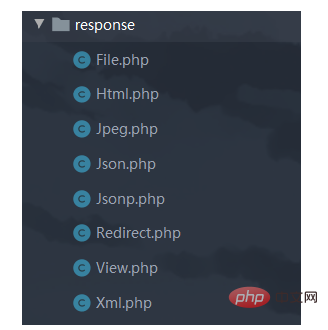
基類Response被這幾個類繼承,我試了下File類,但是這個File是輸出文件,瀏覽器直接下載了
$file = new File('123.jpg'); $response = $file->mimeType('image/jpeg'); throw new HttpResponseException($response);
在看看基類Response
/** * 創建Response對象 * @access public * @param mixed $data 輸出數據 * @param string $type 輸出類型 * @param int $code 狀態碼 * @return Response */ public static function create($data = '', string $type = 'html', int $code = 200): Response { $class = false !== strpos($type, '\') ? $type : '\think\response\' . ucfirst(strtolower($type)); return Container::getInstance()->invokeClass($class, [$data, $code]); }
這里是自動找response目錄下的響應類,但我只想設置一個響應頭來顯示我的圖片,文檔翻遍了沒找到方法,然后看了看目錄下的Html類,那我們可以自己寫一個自定義類來輸出自己想要的響應格式
/** * Html Response */ class Html extends Response { /** * 輸出type * @var string */ protected $contentType = 'text/html'; public function __construct(Cookie $cookie, $data = '', int $code = 200) { $this->init($data, $code); $this->cookie = $cookie; } }
于是我在response目錄寫了一個Jpeg類
/** * Html Response */ class Jpeg extends Response { /** * 輸出type * @var string */ protected $contentType = 'image/jpeg'; public function __construct(Cookie $cookie, $data = '', int $code = 200) { $this->init($data, $code); $this->cookie = $cookie; } }
可以輸出圖片了
$response = Response::create('', 'Jpeg'); $image->blob('JPEG'); throw new HttpResponseException($response);
也許有辦法不用這么麻煩,但是TP官方文檔啥也沒有寫,一下子也找不到其他方法,導致我的header()函數都沒用了,這里引用ThinkPHP論壇網友的一句話
框架的定義就是在于更快速、便捷地開發應用
如果我使用了某款框架還是需要自己去注意條條款款,然后定義或修正許多形式上的規范,那還用框架干嘛呢
本末倒置,雞蛋里面挑骨頭
